Use Case 3: Agentic DevOps Orchestration¶
Duration: ~45 minutes
Goal: Build CI/CD automation that diagnoses pipeline failures, creates fixes, submits PRs, and notifies teams — all from headless mode, hooks, and GitHub Actions.
Exercise PRD: CI/CD Pipeline Health MonitorLast updated: 2026-05-11 · Source verified against gemini-cli repository
3.1 — Headless Mode: CLI Without the CLI (15 min)¶
What Is Headless Mode?¶
Headless mode runs Gemini CLI non-interactively — perfect for scripts, CI/CD pipelines, and automation. No human in the loop.
Basic Headless Usage¶
# Pipe a prompt, get a response
gemini -p "Explain the architecture of this project in 3 sentences."

# Structured output for parsing
gemini -p "List all API endpoints in JSON format." --output-format json

# Check exit codes for automation
gemini -p "Are there any syntax errors in backend/server.js?"
echo "Exit code: $?"
# 0 = success, 1 = error, 2 = safety block
Pipe Build Logs Through Gemini¶
This is the core DevOps pattern — when a build fails, pipe the log to Gemini for diagnosis:
# Simulate a build failure
npm test 2>&1 | gemini -p "Analyze this test output.
Identify the failing tests, the root cause, and suggest a fix.
Classify the failure as: code_error, test_failure, flaky_test,
infra_failure, or config_error."
Structured Output for Automation¶
gemini -p "Analyze this error log and return a JSON object with:
{
  \"failure_type\": \"code_error|test_failure|flaky_test|infra_failure|config_error\",
  \"root_cause\": \"description\",
  \"affected_files\": [\"list\"],
  \"suggested_fix\": \"description\",
  \"severity\": \"low|medium|high|critical\"
}" --output-format json < build-log.txt
Smart Commit Script¶
Create a gcommit alias that generates commit messages from your staged changes:
# Add to ~/.bashrc or ~/.zshrc
gcommit() {
  local diff=$(git diff --cached)
  if [ -z "$diff" ]; then
    echo "No staged changes. Run 'git add' first."
    return 1
  fi
  local msg=$(echo "$diff" | gemini -p "Generate a conventional commit message
    (type: feat|fix|refactor|docs|test|chore) for these changes.
    Be specific about what changed. One line, max 72 characters.")
  echo "Proposed commit message:"
  echo "  $msg"
  read -p "Accept? (y/n/e for edit): " choice
  case $choice in
    y) git commit -m "$msg" ;;
    e) git commit -e -m "$msg" ;;
    *) echo "Aborted." ;;
  esac
}
Batch Processing¶
Process multiple files or tasks in headless mode:
# Generate docs for every controller
for file in backend/controllers/*.js; do
  echo "📝 Generating docs for $file..."
  gemini -p "Generate JSDoc comments for every exported function
    in this file. Include @param types, @returns, and descriptions." \
    --sandbox < "$file" > "${file%.js}.documented.js"
done
3.2 — Hooks for DevOps (10 min)¶
Hook Architecture¶
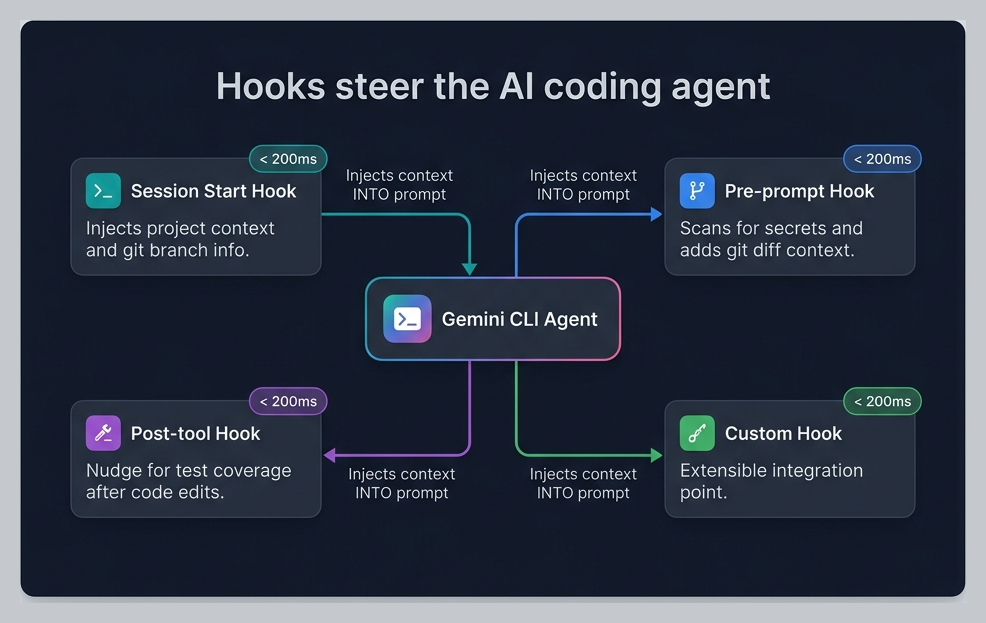
Hooks intercept the agent loop at specific lifecycle events:
The Workshop Hooks¶
Review the 4 hooks configured in this workshop:
| Hook | Event | Purpose | Latency |
|---|---|---|---|
session-context.sh | SessionStart | Injects branch name, dirty file count into session | <200ms |
secret-scanner.sh | BeforeTool | Blocks hardcoded credentials, steers toward env vars | <50ms |
git-context-injector.sh | BeforeTool | Injects recent git history for the target file | <100ms |
test-nudge.sh | AfterTool | Reminds agent to consider running tests after source changes | <10ms |
Design principle: Hooks should be context injectors and model steerers — not heavy computation. Keep them under 200ms. They improve the agent's decisions without adding perceptible latency.
Writing Your Own Hook¶
The JSON-over-stdin/stdout contract:
#!/usr/bin/env bash
# 1. Read JSON input from stdin
input=$(cat)

# 2. Extract what you need with jq
tool_name=$(echo "$input" | jq -r '.tool_name')
filepath=$(echo "$input" | jq -r '.tool_input.file_path // ""')

# 3. Make a decision
# Option A: Allow (default — just return empty JSON)
echo '{}'

# Option B: Deny with reason (steers the model)
echo '{"decision":"deny","reason":"Explanation for the agent..."}'

# Option C: Inject context (systemMessage)
echo '{"systemMessage":"Additional context for the agent..."}'
Critical rules: - stdout is for JSON only — never print debug text to stdout - Use stderr for logging: echo "debug info" >&2 - Always return valid JSON, even if just {} - Use tight timeouts (2-5 seconds max) - Use matchers to avoid running on every tool call
Notification Hooks¶
Forward agent notifications to Slack or Teams:
#!/usr/bin/env bash
# Notification hook — forward to Slack
input=$(cat)
message=$(echo "$input" | jq -r '.message // ""')
notification_type=$(echo "$input" | jq -r '.notification_type // "unknown"')

if [ -n "$SLACK_WEBHOOK_URL" ]; then
  curl -s -X POST "$SLACK_WEBHOOK_URL" \
    -H 'Content-Type: application/json' \
    -d "{\"text\":\"*${notification_type}*\n${message}\"}" >&2
fi
echo '{}'
See Hooks reference for the complete input/output schema for each hook event.
3.3 — GitHub Actions Integration (10 min)¶
The Official GitHub Action¶
Google provides a first-party GitHub Action for running Gemini CLI in CI/CD:
# .github/workflows/gemini-pr-review.yml
name: Gemini PR Review

on:
  pull_request:
    types: [opened, synchronize]

permissions:
  contents: read
  pull-requests: write
  id-token: write  # Required for WIF auth

jobs:
  review:
    runs-on: ubuntu-latest
    steps:
      - uses: actions/checkout@v4
        with:
          fetch-depth: 0  # Full history for better context

      - uses: google-github-actions/auth@v2
        with:
          workload_identity_provider: ${{ secrets.WIF_PROVIDER }}
          service_account: ${{ secrets.WIF_SERVICE_ACCOUNT }}

      - uses: google-github-actions/run-gemini-cli@v1
        with:
          prompt: |
            Review this PR for:
            1. Code quality and adherence to project conventions
            2. Security vulnerabilities (OWASP Top 10)
            3. Missing tests for new functionality
            4. Performance implications

            Post your review as a PR comment with specific
            line references and actionable suggestions.
Workload Identity Federation (WIF)¶
For enterprise deployments, use WIF instead of API keys:
# No secrets in your repo — GitHub authenticates via OIDC
# The WIF provider is configured once in your GCP project
gcloud iam workload-identity-pools create gemini-cli-pool \
  --location="global" \
  --display-name="Gemini CLI CI/CD"
Enterprise value: WIF means zero stored credentials. GitHub proves its identity to GCP via OIDC tokens. No API keys to rotate, no secrets to leak.
Build Failure Diagnosis Pipeline¶
# .github/workflows/diagnose-failure.yml
name: Diagnose Build Failure

on:
  workflow_run:
    workflows: ["CI"]
    types: [completed]

jobs:
  diagnose:
    if: ${{ github.event.workflow_run.conclusion == 'failure' }}
    runs-on: ubuntu-latest
    steps:
      - uses: actions/checkout@v4

      - uses: google-github-actions/auth@v2
        with:
          workload_identity_provider: ${{ secrets.WIF_PROVIDER }}
          service_account: ${{ secrets.WIF_SERVICE_ACCOUNT }}

      - name: Get failed run logs
        run: |
          gh run view ${{ github.event.workflow_run.id }} --log-failed > failed-log.txt
        env:
          GH_TOKEN: ${{ secrets.GITHUB_TOKEN }}

      - uses: google-github-actions/run-gemini-cli@v1
        with:
          prompt: |
            Analyze the build failure in failed-log.txt.

            Classify as: code_error, test_failure, flaky_test,
            infra_failure, or config_error.

            Create a GitHub issue with:
            - Root cause analysis
            - Affected files
            - Suggested fix
            - Severity rating
3.4 — Auto Memory and Batch Ops (10 min)¶
Auto Memory 🔬¶
After working with the agent across multiple sessions, Auto Memory extracts patterns and saves them as memories:
Experimental: Auto Memory requires
experimental.autoMemoryto be enabled in settings.json.
Example auto-learned memories: - "ProShop uses asyncHandler for all async route handlers" - "MongoDB ObjectIds must be validated with checkObjectId middleware" - "Test files follow the pattern *.test.js in __tests__/ directories"
These memories persist across sessions and improve the agent's behavior over time.
Batch Operations¶
Combine headless mode with shell scripting for powerful batch operations:
# Generate API documentation for every route file
for route in backend/routes/*.js; do
  controller=$(echo "$route" | sed 's/routes/controllers/' | sed 's/Routes/Controller/')
  echo "📝 Documenting $route..."
  gemini -p "Read $route and $controller. Generate OpenAPI 3.0
    documentation for every endpoint. Include:
    - HTTP method and path
    - Request parameters and body schema
    - Response schema with status codes
    - Authentication requirements" \
    --output-format json > "docs/api/$(basename $route .js).json"
done
Session Management for Continuity¶
# List recent sessions
gemini --list-sessions

# Resume a specific session by ID
gemini --resume SESSION_ID

# Or use /resume interactively to browse sessions
Hands-On Exercise¶
Open the CI/CD Pipeline Health Monitor PRD and build:
- A headless mode script that pipes build logs through Gemini for diagnosis
- A hook that forwards failure notifications to a webhook
- A GitHub Actions workflow that runs on PR events
- A batch script that generates documentation for the entire API
- Review what Auto Memory captured during the exercise
Add security analysis to your CI pipeline: The official Security Extension ships a ready-to-use GitHub Actions workflow for automated PR security reviews. It runs
/security:analyze(SAST) and/security:scan-deps(dependency CVE scan) on every pull request. Install locally withgemini extensions install https://github.com/gemini-cli-extensions/security, then copy its CI workflow into your repo. See SDLC Productivity §2.3 and Extensions Ecosystem — Exercise 4 for full setup details.
Summary: What You Learned¶
| Feature | What It Does |
|---|---|
| Headless mode | Run Gemini CLI non-interactively in scripts and CI/CD |
| Structured output | --output-format json for machine-readable responses |
| Smart commit | Generate conventional commit messages from diffs |
| Hooks | Lightweight context injection and model steering at lifecycle events |
| GitHub Actions | First-party run-gemini-cli@v1 action for CI/CD |
| WIF auth | Zero-secret authentication via Workload Identity Federation |
| Auto Memory | Agent learns patterns across sessions |
| Batch processing | Loop over files/tasks in headless mode |
| Security in CI | Official Security Extension for automated PR vulnerability analysis |
Workshop Complete! 🎉¶
You've completed all 3 use cases. Review the Cheatsheet for a quick reference of everything covered.
→ Ready for more? Advanced Patterns covers prompting craft, verification loops, context engineering, and parallel development.
For trainers: see the Facilitator Guide for delivery tips and customization options.