Kasus Penggunaan 3: Orkestrasi DevOps Agentic¶
Durasi: ~45 menit
Tujuan: Membangun otomatisasi CI/CD yang mendiagnosis kegagalan pipeline, membuat perbaikan, mengirimkan PR, dan memberi tahu tim — semuanya dari mode headless, hook, dan GitHub Actions.
PRD Latihan: Monitor Kesehatan Pipeline CI/CDTerakhir diperbarui: 2026-05-05 · Sumber diverifikasi terhadap repositori gemini-cli
3.1 — Mode Headless: CLI Tanpa CLI (15 menit)¶
Apa Itu Mode Headless?¶
Mode headless menjalankan Gemini CLI secara non-interaktif — sempurna untuk skrip, pipeline CI/CD, dan otomatisasi. Tanpa campur tangan manusia.
Penggunaan Dasar Mode Headless¶
# Pipe a prompt, get a response
gemini -p "Explain the architecture of this project in 3 sentences."

# Structured output for parsing
gemini -p "List all API endpoints in JSON format." --output-format json

# Check exit codes for automation
gemini -p "Are there any syntax errors in backend/server.js?"
echo "Exit code: $?"
# 0 = success, 1 = error, 2 = safety block
Meneruskan Log Build Melalui Gemini¶
Ini adalah pola inti DevOps — ketika sebuah build gagal, teruskan log ke Gemini untuk diagnosis:
# Simulate a build failure
npm test 2>&1 | gemini -p "Analyze this test output.
Identify the failing tests, the root cause, and suggest a fix.
Classify the failure as: code_error, test_failure, flaky_test,
infra_failure, or config_error."
Output Terstruktur untuk Otomatisasi¶
gemini -p "Analyze this error log and return a JSON object with:
{
  \"failure_type\": \"code_error|test_failure|flaky_test|infra_failure|config_error\",
  \"root_cause\": \"description\",
  \"affected_files\": [\"list\"],
  \"suggested_fix\": \"description\",
  \"severity\": \"low|medium|high|critical\"
}" --output-format json < build-log.txt
Skrip Commit Cerdas¶
Buat alias gcommit yang menghasilkan pesan commit dari perubahan staged Anda:
# Add to ~/.bashrc or ~/.zshrc
gcommit() {
  local diff=$(git diff --cached)
  if [ -z "$diff" ]; then
    echo "No staged changes. Run 'git add' first."
    return 1
  fi
  local msg=$(echo "$diff" | gemini -p "Generate a conventional commit message
    (type: feat|fix|refactor|docs|test|chore) for these changes.
    Be specific about what changed. One line, max 72 characters.")
  echo "Proposed commit message:"
  echo "  $msg"
  read -p "Accept? (y/n/e for edit): " choice
  case $choice in
    y) git commit -m "$msg" ;;
    e) git commit -e -m "$msg" ;;
    *) echo "Aborted." ;;
  esac
}
Pemrosesan Batch¶
Proses beberapa file atau tugas dalam mode headless:
# Generate docs for every controller
for file in backend/controllers/*.js; do
  echo "📝 Generating docs for $file..."
  gemini -p "Generate JSDoc comments for every exported function
    in this file. Include @param types, @returns, and descriptions." \
    --sandbox < "$file" > "${file%.js}.documented.js"
done
3.2 — Hook untuk DevOps (10 menit)¶
Arsitektur Hook¶
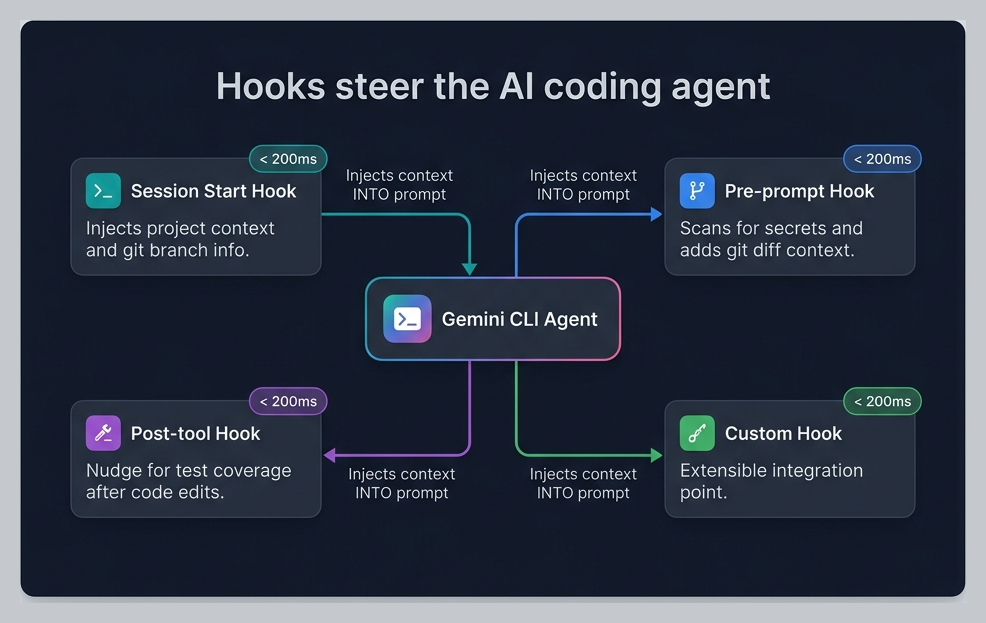
Hook mencegat loop agen pada peristiwa siklus hidup tertentu:
Hook Lokakarya¶
Tinjau 4 hook yang dikonfigurasi dalam lokakarya ini:
| Hook | Peristiwa | Tujuan | Latensi |
|---|---|---|---|
session-context.sh | SessionStart | Menyuntikkan nama cabang, jumlah file kotor ke dalam sesi | <200ms |
secret-scanner.sh | BeforeTool | Memblokir kredensial yang di-hardcode, mengarahkan ke variabel lingkungan | <50ms |
git-context-injector.sh | BeforeTool | Menyuntikkan riwayat git terbaru untuk file target | <100ms |
test-nudge.sh | AfterTool | Mengingatkan agen untuk mempertimbangkan menjalankan pengujian setelah perubahan sumber | <10ms |
Prinsip desain: Hook harus menjadi penyuntik konteks dan pengarah model — bukan komputasi berat. Jaga agar tetap di bawah 200ms. Mereka meningkatkan keputusan agen tanpa menambahkan latensi yang dapat dirasakan.
Menulis Hook Anda Sendiri¶
Kontrak JSON-over-stdin/stdout:
#!/usr/bin/env bash
# 1. Read JSON input from stdin
input=$(cat)

# 2. Extract what you need with jq
tool_name=$(echo "$input" | jq -r '.tool_name')
filepath=$(echo "$input" | jq -r '.tool_input.file_path // ""')

# 3. Make a decision
# Option A: Allow (default — just return empty JSON)
echo '{}'

# Option B: Deny with reason (steers the model)
echo '{"decision":"deny","reason":"Explanation for the agent..."}'

# Option C: Inject context (systemMessage)
echo '{"systemMessage":"Additional context for the agent..."}'
Aturan penting: - stdout hanya untuk JSON — jangan pernah mencetak teks debug ke stdout - Gunakan stderr untuk logging: echo "debug info" >&2 - Selalu kembalikan JSON yang valid, meskipun hanya {} - Gunakan batas waktu yang ketat (maksimal 2-5 detik) - Gunakan pencocok (matcher) untuk menghindari berjalan pada setiap panggilan alat
Hook Notifikasi¶
Teruskan notifikasi agen ke Slack atau Teams:
#!/usr/bin/env bash
# Notification hook — forward to Slack
input=$(cat)
message=$(echo "$input" | jq -r '.message // ""')
notification_type=$(echo "$input" | jq -r '.notification_type // "unknown"')

if [ -n "$SLACK_WEBHOOK_URL" ]; then
  curl -s -X POST "$SLACK_WEBHOOK_URL" \
    -H 'Content-Type: application/json' \
    -d "{\"text\":\"*${notification_type}*\n${message}\"}" >&2
fi
echo '{}'
Lihat Referensi Hook untuk skema input/output lengkap untuk setiap peristiwa hook.
3.3 — Integrasi GitHub Actions (10 menit)¶
GitHub Action Resmi¶
Google menyediakan GitHub Action pihak pertama untuk menjalankan Gemini CLI di CI/CD:
# .github/workflows/gemini-pr-review.yml
name: Gemini PR Review

on:
  pull_request:
    types: [opened, synchronize]

permissions:
  contents: read
  pull-requests: write
  id-token: write  # Required for WIF auth

jobs:
  review:
    runs-on: ubuntu-latest
    steps:
      - uses: actions/checkout@v4
        with:
          fetch-depth: 0  # Full history for better context

      - uses: google-github-actions/auth@v2
        with:
          workload_identity_provider: ${{ secrets.WIF_PROVIDER }}
          service_account: ${{ secrets.WIF_SERVICE_ACCOUNT }}

      - uses: google-github-actions/run-gemini-cli@v1
        with:
          prompt: |
            Review this PR for:
            1. Code quality and adherence to project conventions
            2. Security vulnerabilities (OWASP Top 10)
            3. Missing tests for new functionality
            4. Performance implications

            Post your review as a PR comment with specific
            line references and actionable suggestions.
Workload Identity Federation (WIF)¶
Untuk penerapan perusahaan, gunakan WIF alih-alih kunci API:
# No secrets in your repo — GitHub authenticates via OIDC
# The WIF provider is configured once in your GCP project
gcloud iam workload-identity-pools create gemini-cli-pool \
  --location="global" \
  --display-name="Gemini CLI CI/CD"
Nilai perusahaan: WIF berarti tidak ada kredensial yang disimpan. GitHub membuktikan identitasnya ke GCP melalui token OIDC. Tidak ada kunci API yang perlu dirotasi, tidak ada rahasia yang bocor.
Pipeline Diagnosis Kegagalan Build¶
# .github/workflows/diagnose-failure.yml
name: Diagnose Build Failure

on:
  workflow_run:
    workflows: ["CI"]
    types: [completed]

jobs:
  diagnose:
    if: ${{ github.event.workflow_run.conclusion == 'failure' }}
    runs-on: ubuntu-latest
    steps:
      - uses: actions/checkout@v4

      - uses: google-github-actions/auth@v2
        with:
          workload_identity_provider: ${{ secrets.WIF_PROVIDER }}
          service_account: ${{ secrets.WIF_SERVICE_ACCOUNT }}

      - name: Get failed run logs
        run: |
          gh run view ${{ github.event.workflow_run.id }} --log-failed > failed-log.txt
        env:
          GH_TOKEN: ${{ secrets.GITHUB_TOKEN }}

      - uses: google-github-actions/run-gemini-cli@v1
        with:
          prompt: |
            Analyze the build failure in failed-log.txt.

            Classify as: code_error, test_failure, flaky_test,
            infra_failure, or config_error.

            Create a GitHub issue with:
            - Root cause analysis
            - Affected files
            - Suggested fix
            - Severity rating
3.4 — Auto Memory dan Operasi Batch (10 menit)¶
Auto Memory 🔬¶
Setelah bekerja dengan agen di beberapa sesi, Auto Memory mengekstrak pola dan menyimpannya sebagai memori:
Eksperimental: Auto Memory memerlukan
experimental.autoMemoryuntuk diaktifkan di settings.json.
Contoh memori yang dipelajari secara otomatis: - "ProShop menggunakan asyncHandler untuk semua handler rute async" - "ObjectId MongoDB harus divalidasi dengan middleware checkObjectId" - "File pengujian mengikuti pola *.test.js di direktori __tests__/"
Memori ini bertahan di seluruh sesi dan meningkatkan perilaku agen dari waktu ke waktu.
Operasi Batch¶
Gabungkan mode headless dengan skrip shell untuk operasi batch yang andal:
# Generate API documentation for every route file
for route in backend/routes/*.js; do
  controller=$(echo "$route" | sed 's/routes/controllers/' | sed 's/Routes/Controller/')
  echo "📝 Documenting $route..."
  gemini -p "Read $route and $controller. Generate OpenAPI 3.0
    documentation for every endpoint. Include:
    - HTTP method and path
    - Request parameters and body schema
    - Response schema with status codes
    - Authentication requirements" \
    --output-format json > "docs/api/$(basename $route .js).json"
done
Manajemen Sesi untuk Kontinuitas¶
# List recent sessions
gemini --list-sessions

# Resume a specific session by ID
gemini --resume SESSION_ID

# Or use /resume interactively to browse sessions
Latihan Praktik¶
Buka PRD Monitor Kesehatan Pipeline CI/CD dan bangun:
- Sebuah skrip mode headless yang menyalurkan log build melalui Gemini untuk diagnosis
- Sebuah hook yang meneruskan notifikasi kegagalan ke sebuah webhook
- Sebuah alur kerja GitHub Actions yang berjalan pada peristiwa PR
- Sebuah skrip batch yang menghasilkan dokumentasi untuk seluruh API
- Tinjau apa yang ditangkap oleh Auto Memory selama latihan
Tambahkan analisis keamanan ke pipeline CI Anda: Ekstensi Keamanan resmi menyertakan alur kerja GitHub Actions yang siap pakai untuk tinjauan keamanan PR otomatis. Ini menjalankan
/security:analyze(SAST) dan/security:scan-deps(pemindaian CVE dependensi) pada setiap pull request. Instal secara lokal dengangemini extensions install https://github.com/gemini-cli-extensions/security, lalu salin alur kerja CI-nya ke dalam repo Anda. Lihat Produktivitas SDLC §2.3 dan Ekosistem Ekstensi — Latihan 4 untuk detail pengaturan lengkap.
Ringkasan: Apa yang Anda Pelajari¶
| Fitur | Apa yang Dilakukannya |
|---|---|
| Mode headless | Menjalankan Gemini CLI secara non-interaktif dalam skrip dan CI/CD |
| Output terstruktur | --output-format json untuk respons yang dapat dibaca mesin |
| Smart commit | Menghasilkan pesan commit konvensional dari diff |
| Hook | Injeksi konteks ringan dan pengarahan model pada peristiwa siklus hidup |
| GitHub Actions | Action pihak pertama run-gemini-cli@v1 untuk CI/CD |
| Autentikasi WIF | Autentikasi tanpa rahasia melalui Workload Identity Federation |
| Memori Otomatis | Agen mempelajari pola di seluruh sesi |
| Pemrosesan batch | Melakukan loop pada file/tugas dalam mode headless |
| Keamanan di CI | Ekstensi Keamanan resmi untuk analisis kerentanan PR otomatis |
Workshop Selesai! 🎉¶
Anda telah menyelesaikan ketiga kasus penggunaan. Tinjau Lembar Contekan untuk referensi cepat tentang semua yang telah dibahas.
→ Siap untuk lebih banyak lagi? Pola Lanjutan mencakup keterampilan prompt, loop verifikasi, rekayasa konteks, dan pengembangan paralel.
Untuk pelatih: lihat Panduan Fasilitator untuk kiat penyampaian dan opsi penyesuaian.