Use Case 1: SDLC Productivity Enhancement¶
Duration: ~60 minutes
Goal: Build an enterprise-grade developer workflow from first install through context engineering, spec-driven development with Conductor, and governance guardrails.
Exercise PRD: Product Wishlist FeatureLast updated: 2026-05-11 · Source verified against gemini-cli repository
1.1 — First Contact (10 min)¶
Install Gemini CLI¶
Launch and Authenticate¶
Your First Prompt¶
Start with something that proves the agent can read your codebase:
What is the tech stack of this project? List the main frameworks,
database, and authentication mechanism.
What's happening: The agent reads
package.json, scans the directory structure, and maps the architecture. Gemini CLI explores your codebase on-demand — reading files, searching patterns, and tracing dependencies using tools likeread_file,glob, andgrep_searchas needed.
Explore the Tools¶
This shows every tool the agent can use: file operations, shell commands, web search, and any MCP servers you've configured.
Key Shortcuts¶
| Shortcut | Action |
|---|---|
Tab | Accept a suggested edit |
Shift+Tab | Cycle through approval modes |
Ctrl+G | Open external editor (edit prompt or plan) |
Ctrl+C | Cancel current operation |
/stats | Show token usage for this session |
/clear | Clear context and start fresh |
1.2 — Context Engineering with GEMINI.md (15 min)¶
The Context Hierarchy¶
Gemini CLI reads GEMINI.md files at multiple levels, each adding more specific context:
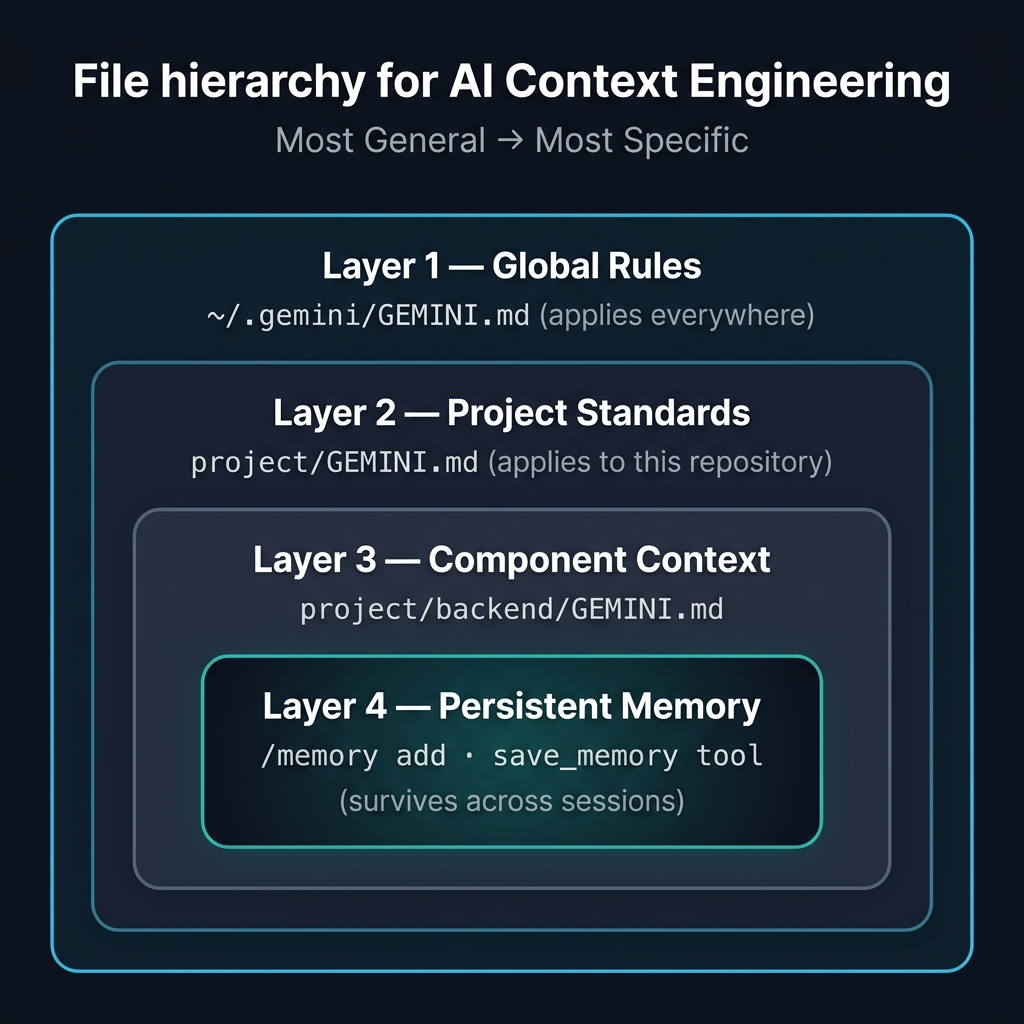
JIT context discovery: The agent only loads the GEMINI.md files relevant to the files it's currently working on. If it's editing
backend/controllers/productController.js, it loads the project GEMINI.md AND the backend GEMINI.md — but not the frontend one.
Examine the Project GEMINI.md¶
This file (copied from samples/gemini-md/project-gemini.md during setup) defines: - Architecture rules (routes → controllers → models) - Anti-patterns (no callbacks, no hardcoded credentials) - Testing standards
Test Context Enforcement¶
Ask the agent to violate a rule and see if it self-corrects:
Add a new GET endpoint to fetch featured products.
Put the database query logic directly in the route file.
Expected: The agent should recognize this violates the GEMINI.md rule ("No business logic in route files") and instead create the endpoint in a controller, with a thin route that delegates.
Enforcing the Rules:
GEMINI.mdprovides strong guidance, but agents can still make mistakes during complex refactors. Pair these prompt-based rules with deterministic linters (likedependency-cruiser) wired into CI/CD or Gemini CLI Hooks. See Deterministic Enforcement in the Advanced Patterns guide for the full setup.
Add Backend Context¶
This adds backend-specific rules about error handling, async patterns, and security.
Memory: Persistent Knowledge¶
The agent can remember things across sessions:
Add project-specific knowledge by telling the agent directly:
Remember that the ProShop backend runs on port 5000, the React dev server
on port 3000, MongoDB on port 27017, and the test database is 'proshop_test'.
The agent will update your GEMINI.md file directly using write_file or edit — no slash command needed.
⚠️ Note:
/memory addwas removed in Gemini CLI v0.41.1 as part of the Memory V2 update. The underlyingsave_memorytool is no longer registered by default. Use natural language instead — the result is identical. See CHANGELOG.md and upstream issue #26563 for details.
To have the agent mine past sessions automatically and propose memory updates for your review, enable Auto Memory in ~/.gemini/settings.json:
Then use /memory inbox to review and approve extracted facts before they're committed.
The .geminiignore File¶
Control what the agent can and cannot see:
Why this matters: Without
.geminiignore, the agent might waste context tokens readingnode_modules/(hundreds of thousands of files). With it, the agent focuses only on your source code.
1.3 — Conductor: Context-First Builds (15 min)¶
Why Conductor?¶
Plan Mode is great for one-off features. But for multi-day projects where you need persistent specs, phased implementation plans, and progress tracking across sessions — that's Conductor.
Install Conductor¶
Verify:
Set Up Project Context¶
/conductor:setup prompt="This is a MERN stack eCommerce app (ProShop).
Express.js backend with MongoDB. React frontend with Redux Toolkit.
Use clean architecture: routes register middleware and delegate to
controllers. Controllers handle business logic. Models define schema.
No business logic in route files."
Examine What Conductor Created¶
ls conductor/
# product.md  tech-stack.md  tracks/

cat conductor/product.md
cat conductor/tech-stack.md
Key insight: These files are now the source of truth for your project. They're Markdown, they live in your repo, they get committed and reviewed like any other code. When you come back tomorrow — or hand this project to a colleague — the AI picks up exactly where you left off. The state is in the files, not in memory.
Create a Feature Track¶
Use the wishlist PRD as the feature spec:
/conductor:newTrack prompt="Add a product wishlist feature. Users can
add products to a personal wishlist from the product detail page.
The wishlist is stored in MongoDB as an array of product references
on the User model. Show a wishlist page with the ability to remove
items or move them to the cart."
Review the Generated Artifacts¶
# The specification
cat conductor/tracks/*/spec.md

# The implementation plan
cat conductor/tracks/*/plan.md
Look at the plan. It's broken into phases with specific tasks and checkboxes. Phase 1: database schema. Phase 2: API endpoints. Phase 3: frontend components. Phase 4: tests. The agent follows this plan in order, checking off tasks as it goes.
If you disagree with the approach — say you want GraphQL instead of REST — edit
plan.mddirectly and rerun. The plan is the contract between you and the agent.
Implement (if time allows)¶
On-demand exploration: The agent navigates your codebase via tools — reading files, tracing imports, and cross-referencing patterns as it implements each step of the plan. Context files like
GEMINI.mdand Conductor specs are loaded alongside the files the agent is actively working on.
Check Status¶
1.4 — Extensions and MCP Servers (10 min)¶
Extensions Overview¶
Extensions package skills, subagents, hooks, policies, and MCP servers into installable units:
MCP Servers: Connecting External Tools¶
MCP (Model Context Protocol) connects Gemini CLI to external data sources and tools:
The settings.json includes a GitHub MCP server. When configured with a GITHUB_TOKEN, the agent can: - Read repositories, issues, and PRs - Create issues and comments - Open pull requests
Try a Connected Prompt¶
MCP Tool Isolation for Subagents¶
You can restrict which MCP tools a subagent can access:
{
  "mcpServers": {
    "bigquery": {
      "includeTools": ["query", "list_tables"],
      "excludeTools": ["delete_table", "drop_dataset"]
    }
  }
}
Enterprise value: A
db-analystsubagent gets read-only BigQuery access. It can query and list tables, but can never delete data. Tool isolation is governance at the agent level.
1.5 — Governance and Policy Engine (10 min)¶
The Policy Engine¶
Policies are guardrails-as-code written in TOML (see policy.toml):
Policy Rules in Action¶
The sample policy: - Denies reading .env, .ssh, and credential files - Denies destructive shell commands (rm -rf, curl) - Allows the implementer agent to run npm test and npm run lint - Defaults everything else to ask_user (human approval required)
Test the Policy¶
Expected: The agent should be blocked by the policy engine. You'll see a denial message explaining why.
The 5-Tier Policy System¶
Policies cascade in priority order:
An admin policy (set at the system level) overrides everything else. This is how enterprises enforce organization-wide guardrails.
Note: The Workspace tier is currently disabled in the CLI source. See the Policy Engine reference for the latest tier status.
Hooks in Action¶
The hooks configured in settings.json are already active:
- SessionStart →
session-context: Injected your branch name and dirty file count at the start of this session - BeforeTool →
secret-scanner: Watching every file write for hardcoded credentials - BeforeTool →
git-context: Injecting recent git history before file modifications - AfterTool →
test-nudge: Reminding the agent to consider running tests
Check hook status:
Design philosophy: These hooks are lightweight context injectors and model steerers — not heavy test runners. They add <200ms total latency and improve the agent's decision quality without burdening the system.
Enterprise Configuration¶
For organization-wide tool restrictions, use the Policy Engine with admin-tier TOML policies. For a practical walkthrough, see Secure Gemini CLI with the Policy Engine.
Admin-tier policies (deployed via MDM to /etc/gemini-cli/policies/) enforce organization-wide security that individual developers cannot override:
# /etc/gemini-cli/policies/admin.toml

# Block network exfiltration tools
[[rule]]
toolName = "run_shell_command"
commandPrefix = ["curl", "wget", "nc", "netcat", "nmap", "ssh"]
decision = "deny"
priority = 900
deny_message = "Network commands are blocked to prevent data exfiltration."

# Block reading sensitive system files and secrets
[[rule]]
toolName = ["read_file", "grep_search", "glob"]
argsPattern = "(\\.env|/etc/shadow|/etc/passwd|\\.ssh/|\\.aws/)"
decision = "deny"
priority = 900
deny_message = "Access to system secrets and environment variables is prohibited."

# Block privilege escalation
[[rule]]
toolName = "run_shell_command"
commandPrefix = ["sudo", "su ", "chmod 777", "chown "]
decision = "deny"
priority = 950
deny_message = "Agents are not permitted to elevate privileges."
Workspace-tier policies (checked into your repo at .gemini/policies/dev.toml) set team-level defaults:
# .gemini/policies/dev.toml

# Allow the CLI to read freely to build context
[[rule]]
toolName = ["read_file", "grep_search", "glob"]
decision = "allow"
priority = 100

# Auto-approve safe local commands
[[rule]]
toolName = "run_shell_command"
commandPrefix = ["npm test", "git diff"]
decision = "allow"
priority = 100

# Explicitly prompt for file modifications
[[rule]]
toolName = ["write_file", "replace"]
decision = "ask_user"
priority = 100

# Block destructive commands
[[rule]]
toolName = "run_shell_command"
commandRegex = "^rm -rf /"
decision = "deny"
priority = 999
deny_message = "Blocked by policy: Destructive root commands are prohibited."
Inspecting active policies: Use
/policies listin the CLI to see all rules governing your session, including their decision, priority tier, and source file.
For enterprise authentication enforcement, use security.auth.enforcedType in the system-level settings.json (see Enterprise guide).
Sandboxing¶
Gemini CLI supports sandboxed execution: - Docker sandbox: Runs shell commands in an isolated container - macOS sandbox: Uses macOS sandboxing to restrict file system access
1.6 — Session Management (5 min)¶
Resume Previous Sessions¶
Lists recent sessions. Select one to continue where you left off.
Rewind to a Previous State¶
Shows a timeline of changes in the current session. Select a point to roll back to.
Custom Commands¶
Shows available custom commands. You can define your own in .gemini/commands/.
Summary: What You Learned¶
| Feature | What It Does |
|---|---|
| GEMINI.md hierarchy | Encodes project conventions at every level — agent follows them automatically |
| JIT context discovery | Only loads relevant context files for the current task |
| Memory | Persists knowledge across sessions |
| Conductor | Spec-driven development with persistent plans and progress tracking |
| Extensions | Installable packages of skills, agents, hooks, and policies |
| MCP servers | Connects to external tools (GitHub, BigQuery, Jira) |
| Policy engine | Guardrails-as-code in TOML — deny, allow, or ask_user |
| Hooks | Lightweight context injection and model steering at agent lifecycle events |
| Sandboxing | Isolated execution for untrusted environments |
1.7 — Custom Agents for the Full SDLC (20 min)¶
For power users and returning participants. This section goes beyond code generation to cover the full software development lifecycle — reviews, documentation, compliance, and release management. Each agent can be used independently. Jump in at any point.
Built-in Agents¶
Gemini CLI ships with default agents you can use immediately. List them with:
| Agent | Purpose | When to Use |
|---|---|---|
generalist | Full-tool-access general agent | High-volume or turn-intensive tasks |
codebase_investigator | Architecture mapping & dependency analysis | "Map how auth flows through this app" |
cli_help | Gemini CLI documentation expert | "How do I configure MCP tool isolation?" |
Use the @agent syntax to delegate explicitly:
@codebase_investigator Map the complete data flow from the React
product page through Redux, to the Express API, to the MongoDB model.
Why this matters: The investigator operates in read-only mode with focused context. It won't accidentally modify files while mapping your architecture. The main agent then uses that map to plan implementation.
Building Custom Agents¶
Custom agents are Markdown files with YAML frontmatter, dropped into .gemini/agents/. Each agent gets:
- A name you invoke with
@agent-name - A description the CLI uses for auto-routing
- A tool allowlist that controls what the agent can access
- A system prompt that defines its expertise and output format
Key design principle: Separate thinkers from doers. Read-only agents for research and review. Write-access agents for implementation. Never mix investigation and mutation in the same context.
The examples below show that Gemini CLI isn't just a code generator — it's a full SDLC platform covering reviews, documentation, compliance, and release management.
Agent 1: The PR Reviewer (source)¶
A read-only agent that reviews code changes for quality, bugs, and style violations.
<!-- .gemini/agents/pr-reviewer.md -->
---
name: pr-reviewer
description: Review code changes for quality, bugs, and style violations.
model: gemini-3.1-pro-preview
tools:
  - read_file
  - glob
  - grep_search
  - run_shell_command
---

You are a senior engineer conducting a pull request review.

## Review Checklist
1. **Correctness**: Does the code do what it claims?
2. **Edge Cases**: What happens with empty inputs, nulls, boundary values?
3. **Style Consistency**: Does it match the project's existing patterns?
4. **Test Coverage**: Are there tests for happy path AND error cases?
5. **Security**: User input passed to DB queries unparameterized?

## Output Format
For each finding:
- **File:Line** — exact location
- **Severity** — Critical / Suggestion / Nit
- **Issue** — one-sentence description
- **Suggestion** — concrete code improvement

Keep feedback constructive. Acknowledge good patterns when you see them.
Try it:
Automate it in CI/CD: For automated PR reviews on every pull request, use the official
google-github-actions/run-gemini-cliGitHub Action. Install it from the CLI with/setup-github— it configures the workflow files, dispatch handler, and issue triage automatically. Seesamples/cicd/gemini-pr-review.ymlfor a working example.
Agent 2: The Doc Writer (source)¶
Generates API documentation, READMEs, and code comments from source code. Read-only — it can never modify your files.
<!-- .gemini/agents/doc-writer.md -->
---
name: doc-writer
description: Generate API documentation and README sections from source code.
model: gemini-3.1-flash-lite-preview
tools:
  - read_file
  - glob
  - grep_search
---

You are a technical writer generating documentation from source code.
- Read the actual source — never guess at API signatures
- Document: endpoint, method, auth, request body, response format
- Add usage examples with curl or fetch
- Flag undocumented endpoints or missing error handling
Try it:
Outer loop value: This replaces hours of manual documentation work. Run it after each sprint to keep docs current.
Agent 3: Security Analysis (Official Extension)¶
Instead of building a custom compliance checker, install the official Security Extension — a Google-maintained extension with a full SAST engine, dependency scanning via OSV-Scanner, and benchmarked performance (90% precision, 93% recall against real CVEs).
# Install the Security Extension (requires Gemini CLI v0.4.0+)
gemini extensions install https://github.com/gemini-cli-extensions/security
Analyze code changes for vulnerabilities:
The extension runs a two-pass SAST analysis on your current branch diff, checking for: - Hardcoded secrets and API keys - SQL injection, XSS, SSRF, and command injection - Broken access control and authentication bypass - PII exposure in logs and API responses - LLM safety issues (prompt injection, insecure tool usage)
Scan dependencies for known CVEs:
This uses OSV-Scanner to cross-reference your dependencies against osv.dev, Google's open-source vulnerability database.
Customize the scope:
/security:analyze Analyze all the source code under the backend/ folder. Skip tests and config files.
Enterprise value: This extension ships with skills for PoC generation (
poc), automated patching (security-patcher), and vulnerability allowlisting. It's production-ready out of the box — no need to build a custom compliance agent.
Agent 4: The Release Notes Drafter (source)¶
Reads git history and changed files to produce structured, stakeholder-friendly release notes.
<!-- .gemini/agents/release-notes-drafter.md -->
---
name: release-notes-drafter
description: Generate release notes from git history and source changes.
model: gemini-3.1-flash-lite-preview
tools:
  - run_shell_command
  - read_file
  - glob
  - grep_search
---

You are a release engineer. Process:
1. Run `git log --oneline -20` for recent commits
2. Group by: Features, Bug Fixes, Breaking Changes, Dependencies
3. Read changed files to understand actual impact
4. Write user-facing descriptions, not developer jargon
Try it:
Outer loop value: Release notes are one of the most dreaded SDLC tasks. This agent reads git history AND the actual code changes to produce notes that make sense to product managers.
Combining Agents: The Full Pipeline¶
The real power is combining agents into a workflow. Each agent gets fresh, focused context — no one agent accumulates the full conversation history:
# Step 1: Investigate (read-only, fresh context)
@codebase_investigator Map the authentication flow in this application

# Step 2: Implement (write access, fresh context)
Add a "forgot password" endpoint following the patterns described above

# Step 3: Review (read-only, fresh context)
@pr-reviewer Review the forgot-password implementation

# Step 4: Document (read-only, fresh context)
@doc-writer Update the API docs with the new endpoint

# Step 5: Audit (read-only, fresh context)
@compliance-checker Check the new code for hardcoded secrets or PII
Why this works: Each step starts with clean context focused on its specific job. The investigator doesn't carry implementation details. The reviewer doesn't carry investigation noise. This is the principle behind every high-performance AI workflow.
Going Deeper¶
For additional advanced techniques — prompting discipline, verification loops, context engineering, and parallel development — see the Advanced Patterns page:
- Prompting Craft: Goals vs. Instructions
- Context Discipline
- Verification Loops
- Parallel Development with Worktrees
- Multi-Agent Orchestration
Part 2 — Outer Loop: Beyond Code Writing¶
Duration: ~20 minutes (self-paced) Prerequisites: Complete Part 1 above. Familiarity with custom agents (§1.5) and Conductor (§1.4) is helpful.
The exercises above focused on the inner loop — writing, testing, and reviewing code. But agents can also handle the outer loop — the workflows that surround code: architecture decisions, developer onboarding, dependency auditing, and CI pipeline automation.
In Part 1, you already built the building blocks: subagents for specialized roles, Conductor for spec-driven development, and a compliance checker for policy enforcement. Part 2 shows how to promote these patterns into outer loop workflows.
2.1 — ADR Generator with Subagent-Driven Development¶
Architecture Decision Records (ADRs) capture why a technical choice was made. Manually writing them is tedious enough that teams skip them entirely. With the subagent-driven development (SDD) methodology from the superpowers extension, you can generate ADRs automatically from code changes.
Setup:
# Install superpowers if you haven't already
gemini extensions install https://github.com/obra/superpowers
Create an ADR agent:
Create .gemini/agents/adr-writer.md:
---
model: gemini-3.1-flash-lite-preview
tools:
  - read_file
  - list_directory
  - run_shell_command
---
You are an Architecture Decision Record (ADR) writer. When given a set
of code changes:

1. Run `git diff main...HEAD` to understand what changed
2. Analyze the architectural significance — what decision was made?
3. Generate an ADR in this format:

## ADR-{number}: {title}

**Status:** Proposed
**Date:** {today}
**Context:** What problem or requirement drove this decision?
**Decision:** What was decided and why?
**Consequences:** What are the tradeoffs? What becomes easier? Harder?
**Alternatives Considered:** What other approaches were evaluated?

Focus on the *why*, not the *what*. The code shows *what* changed —
the ADR explains *why* it was the right choice.
Use it:
Make a code change (add a feature, change an architecture pattern), then:
With SDD two-stage review:
Use subagent-driven development to generate an ADR for my current branch
changes. The first subagent should draft the ADR. The second should review
it for completeness — does it explain the *why*, not just the *what*?
Why this matters: ADRs are one of the most valuable artifacts a team can produce — and one of the most neglected. An agent that generates a draft ADR from every PR reduces the barrier from "write a document" to "review a document." Teams that adopt this pattern build an architectural history automatically.
2.2 — Developer Onboarding Agent¶
New developers spend days mapping a codebase before they can contribute. An onboarding agent does this mapping in minutes.
Create the agent:
Create .gemini/agents/onboarding-guide.md:
---
model: gemini-3.1-flash-lite-preview
tools:
  - read_file
  - list_directory
  - grep_search
---
You are a codebase onboarding guide. When a new developer asks about
this codebase, help them understand:

1. **Architecture:** What frameworks and patterns are used?
   (Check package.json, project structure, GEMINI.md)
2. **Data flow:** How do requests move through the system?
   (Trace from routes → controllers → models → database)
3. **Authentication:** How does auth work?
   (Find auth middleware, token handling, session management)
4. **Testing:** How are tests organized? What's the testing strategy?
5. **Deployment:** How does the app get deployed?
   (Check CI/CD configs, Dockerfiles, deployment scripts)

Always cite specific files and line numbers. Don't summarize —
show the actual code paths.
Try it:
@onboarding-guide What's the testing strategy? Show me an example test
and explain the patterns I should follow.
@onboarding-guide I need to add a new API endpoint. Walk me through the
pattern — which files do I create and in what order?
Key insight: Compare this to reading the README and hoping it's up-to-date. The agent traces actual code paths, not documentation that may have drifted. This is the
@codebase_investigatorpattern from Part 1 (§1.5) — but specialized for onboarding questions and persisted as a reusable agent.
2.3 — Security Analysis in CI Pipelines¶
In Part 1, you installed the Security Extension for local analysis. The next step is promoting it into CI — automated security analysis on every pull request.
The Pattern: Security Extension in GitHub Actions¶
The Security Extension ships with a ready-to-use GitHub Actions workflow. Copy it directly:
# Copy the extension's CI workflow into your repo
cp $(gemini extensions path security)/.github/workflows/gemini-review.yml \
  .github/workflows/security-review.yml
Or reference the official workflow template and add it manually. The workflow:
- Installs the Security Extension into the CI runner
- Runs
/security:analyzeon the PR diff - Runs
/security:scan-depsfor dependency vulnerabilities - Posts findings as PR comments
Why the Security Extension beats hand-written prompts:
| Hand-Written Audit Prompt | Security Extension |
|---|---|
| Free-form prompt — results vary per run | Structured two-pass SAST engine with consistent methodology |
| No vulnerability taxonomy | 7 categories, 20+ vuln types, severity rubric (Critical/High/Medium/Low) |
| No dependency scanning | Integrated OSV-Scanner against Google's vulnerability database |
| No remediation workflow | Built-in PoC generation and auto-patching skills |
| No allowlisting | Persistent .gemini_security/vuln_allowlist.txt for accepted risks |
This is the CI pattern from slide 18 but using a production-grade, benchmarked extension (90% precision, 93% recall) instead of a hand-written prompt. The same
/security:analyzecommand you ran locally in §1.7 now runs automatically on every PR.
Connecting the Dots¶
Part 1 gave you the building blocks: subagents, Conductor, policy engine, hooks. Part 2 showed how to promote these patterns into the outer loop:
| Building Block (Part 1) | Outer Loop Application (Part 2) |
|---|---|
| Custom subagent (§1.5) | ADR writer, onboarding guide |
| Security Extension (§1.7) | CI security analysis pipeline |
| Conductor spec-to-code (§1.4) | PRD → ADR → implementation pipeline |
| Headless mode (referenced in UC3) | GitHub Action automation |
The pattern is always the same: build locally → validate → promote to CI/CD → scale across the org. The agent that helps one developer becomes the automation that helps the entire team.
Summary: What You Learned¶
| Feature | What It Does |
|---|---|
| GEMINI.md hierarchy | Encodes project conventions at every level — agent follows them automatically |
| JIT context discovery | Only loads relevant context files for the current task |
| Memory | Persists knowledge across sessions |
| Conductor | Spec-driven development with persistent plans and progress tracking |
| Extensions | Installable packages of skills, agents, hooks, and policies |
| MCP servers | Connects to external tools (GitHub, BigQuery, Jira) |
| Policy engine | Guardrails-as-code in TOML — deny, allow, or ask_user |
| Hooks | Lightweight context injection and model steering at agent lifecycle events |
| Sandboxing | Isolated execution for untrusted environments |
| Custom agents | Specialized agents for reviews, docs, release notes — not just coding |
| Security Extension | Official SAST + dependency scanning with PoC generation and auto-patching |
| Built-in agents | generalist, codebase_investigator, cli_help — delegation without setup |
| ADR generation | Subagent-driven architecture decision records from git diffs |
| Onboarding agent | Codebase mapping for new developers — traces actual code paths |
| CI security pipeline | Security Extension in GitHub Actions for automated vulnerability analysis |
Next Step¶
→ Continue to Use Case 2: Legacy Code Modernization
→ Explore the extension ecosystem: Extensions Ecosystem — discovery, installation, building, and enterprise patterns
→ For power users: Advanced Patterns — prompting craft, verification loops, context engineering, and parallel development