使用场景 3:代理式 DevOps 编排¶
时长: 约 45 分钟
目标: 构建 CI/CD 自动化,以诊断流水线故障、创建修复、提交 PR 并通知团队——所有这些都通过无头模式、钩子和 GitHub Actions 完成。
练习 PRD: CI/CD 流水线健康监控器最后更新:2026-05-05 · 来源已针对 gemini-cli 仓库进行验证
3.1 — 无头模式:没有 CLI 的 CLI(15 分钟)¶
什么是无头模式?¶
无头模式以非交互式方式运行 Gemini CLI —— 非常适合脚本、CI/CD 流水线和自动化。无需人工干预。
基本无头模式用法¶
# Pipe a prompt, get a response
gemini -p "Explain the architecture of this project in 3 sentences."

# Structured output for parsing
gemini -p "List all API endpoints in JSON format." --output-format json

# Check exit codes for automation
gemini -p "Are there any syntax errors in backend/server.js?"
echo "Exit code: $?"
# 0 = success, 1 = error, 2 = safety block
将构建日志通过管道传递给 Gemini¶
这是核心的 DevOps 模式 —— 当构建失败时,将日志通过管道传递给 Gemini 进行诊断:
# Simulate a build failure
npm test 2>&1 | gemini -p "Analyze this test output.
Identify the failing tests, the root cause, and suggest a fix.
Classify the failure as: code_error, test_failure, flaky_test,
infra_failure, or config_error."
用于自动化的结构化输出¶
gemini -p "Analyze this error log and return a JSON object with:
{
  \"failure_type\": \"code_error|test_failure|flaky_test|infra_failure|config_error\",
  \"root_cause\": \"description\",
  \"affected_files\": [\"list\"],
  \"suggested_fix\": \"description\",
  \"severity\": \"low|medium|high|critical\"
}" --output-format json < build-log.txt
智能提交脚本¶
创建一个 gcommit 别名,根据您暂存的更改生成提交信息:
# Add to ~/.bashrc or ~/.zshrc
gcommit() {
  local diff=$(git diff --cached)
  if [ -z "$diff" ]; then
    echo "No staged changes. Run 'git add' first."
    return 1
  fi
  local msg=$(echo "$diff" | gemini -p "Generate a conventional commit message
    (type: feat|fix|refactor|docs|test|chore) for these changes.
    Be specific about what changed. One line, max 72 characters.")
  echo "Proposed commit message:"
  echo "  $msg"
  read -p "Accept? (y/n/e for edit): " choice
  case $choice in
    y) git commit -m "$msg" ;;
    e) git commit -e -m "$msg" ;;
    *) echo "Aborted." ;;
  esac
}
批处理¶
在无头模式下处理多个文件或任务:
# Generate docs for every controller
for file in backend/controllers/*.js; do
  echo "📝 Generating docs for $file..."
  gemini -p "Generate JSDoc comments for every exported function
    in this file. Include @param types, @returns, and descriptions." \
    --sandbox < "$file" > "${file%.js}.documented.js"
done
3.2 — DevOps 钩子 (10 分钟)¶
钩子架构¶
钩子在特定的生命周期事件中拦截代理循环:
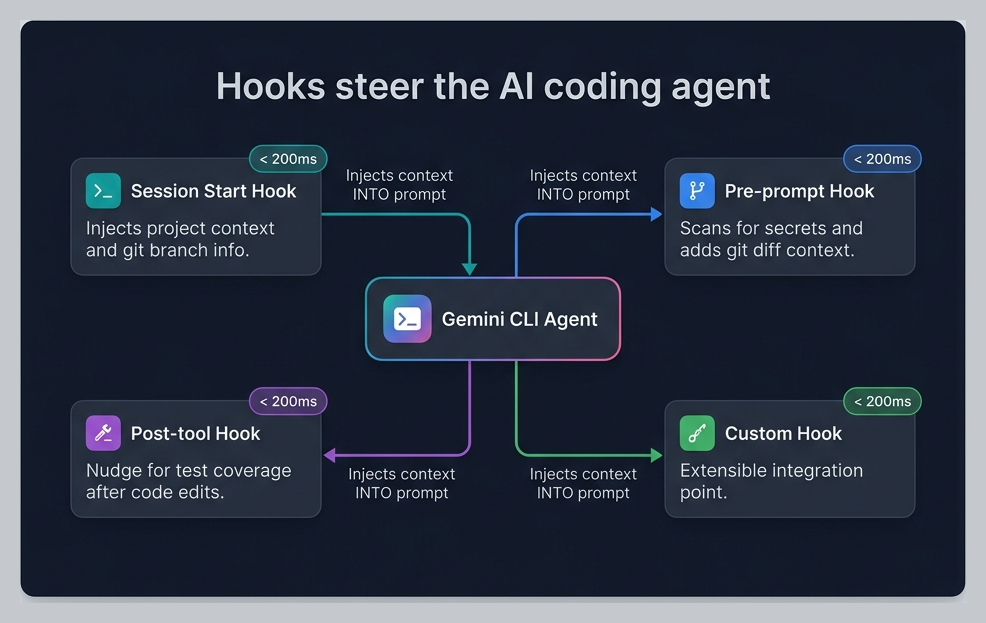
研讨会钩子¶
回顾本次研讨会中配置的 4 个钩子:
| 钩子 | 事件 | 目的 | 延迟 |
|---|---|---|---|
session-context.sh | SessionStart | 将分支名称、脏文件数量注入到会话中 | <200ms |
secret-scanner.sh | BeforeTool | 阻止硬编码凭据,引导使用环境变量 | <50ms |
git-context-injector.sh | BeforeTool | 注入目标文件的最近 git 历史记录 | <100ms |
test-nudge.sh | AfterTool | 提醒代理在源码更改后考虑运行测试 | <10ms |
设计原则: 钩子应该是上下文注入器和模型引导器 —— 而不是繁重的计算。将它们的执行时间保持在 200ms 以下。它们在不增加可感知延迟的情况下改善代理的决策。
编写你自己的钩子¶
基于 stdin/stdout 的 JSON 契约:
#!/usr/bin/env bash
# 1. Read JSON input from stdin
input=$(cat)

# 2. Extract what you need with jq
tool_name=$(echo "$input" | jq -r '.tool_name')
filepath=$(echo "$input" | jq -r '.tool_input.file_path // ""')

# 3. Make a decision
# Option A: Allow (default — just return empty JSON)
echo '{}'

# Option B: Deny with reason (steers the model)
echo '{"decision":"deny","reason":"Explanation for the agent..."}'

# Option C: Inject context (systemMessage)
echo '{"systemMessage":"Additional context for the agent..."}'
关键规则: - stdout 仅用于 JSON —— 永远不要向 stdout 打印调试文本 - 使用 stderr 进行日志记录:echo "debug info" >&2 - 始终返回有效的 JSON,即使只是 {} - 使用严格的超时时间(最多 2-5 秒) - 使用匹配器以避免在每次工具调用时运行
通知钩子¶
将代理通知转发到 Slack 或 Teams:
#!/usr/bin/env bash
# Notification hook — forward to Slack
input=$(cat)
message=$(echo "$input" | jq -r '.message // ""')
notification_type=$(echo "$input" | jq -r '.notification_type // "unknown"')

if [ -n "$SLACK_WEBHOOK_URL" ]; then
  curl -s -X POST "$SLACK_WEBHOOK_URL" \
    -H 'Content-Type: application/json' \
    -d "{\"text\":\"*${notification_type}*\n${message}\"}" >&2
fi
echo '{}'
有关每个钩子事件的完整输入/输出模式,请参阅 钩子参考。
3.3 — GitHub Actions 集成 (10 分钟)¶
官方 GitHub Action¶
Google 提供了一个第一方 GitHub Action,用于在 CI/CD 中运行 Gemini CLI:
# .github/workflows/gemini-pr-review.yml
name: Gemini PR Review

on:
  pull_request:
    types: [opened, synchronize]

permissions:
  contents: read
  pull-requests: write
  id-token: write  # Required for WIF auth

jobs:
  review:
    runs-on: ubuntu-latest
    steps:
      - uses: actions/checkout@v4
        with:
          fetch-depth: 0  # Full history for better context

      - uses: google-github-actions/auth@v2
        with:
          workload_identity_provider: ${{ secrets.WIF_PROVIDER }}
          service_account: ${{ secrets.WIF_SERVICE_ACCOUNT }}

      - uses: google-github-actions/run-gemini-cli@v1
        with:
          prompt: |
            Review this PR for:
            1. Code quality and adherence to project conventions
            2. Security vulnerabilities (OWASP Top 10)
            3. Missing tests for new functionality
            4. Performance implications

            Post your review as a PR comment with specific
            line references and actionable suggestions.
工作负载身份联合 (WIF)¶
对于企业部署,请使用 WIF 而不是 API 密钥:
# No secrets in your repo — GitHub authenticates via OIDC
# The WIF provider is configured once in your GCP project
gcloud iam workload-identity-pools create gemini-cli-pool \
  --location="global" \
  --display-name="Gemini CLI CI/CD"
企业价值: WIF 意味着零存储凭据。GitHub 通过 OIDC 令牌向 GCP 证明其身份。没有需要轮换的 API 密钥,也没有会泄露的机密。
构建失败诊断流水线¶
# .github/workflows/diagnose-failure.yml
name: Diagnose Build Failure

on:
  workflow_run:
    workflows: ["CI"]
    types: [completed]

jobs:
  diagnose:
    if: ${{ github.event.workflow_run.conclusion == 'failure' }}
    runs-on: ubuntu-latest
    steps:
      - uses: actions/checkout@v4

      - uses: google-github-actions/auth@v2
        with:
          workload_identity_provider: ${{ secrets.WIF_PROVIDER }}
          service_account: ${{ secrets.WIF_SERVICE_ACCOUNT }}

      - name: Get failed run logs
        run: |
          gh run view ${{ github.event.workflow_run.id }} --log-failed > failed-log.txt
        env:
          GH_TOKEN: ${{ secrets.GITHUB_TOKEN }}

      - uses: google-github-actions/run-gemini-cli@v1
        with:
          prompt: |
            Analyze the build failure in failed-log.txt.

            Classify as: code_error, test_failure, flaky_test,
            infra_failure, or config_error.

            Create a GitHub issue with:
            - Root cause analysis
            - Affected files
            - Suggested fix
            - Severity rating
3.4 — 自动记忆与批量操作 (10 分钟)¶
自动记忆 🔬¶
在跨多个会话与代理协作后,自动记忆会提取模式并将其保存为记忆:
实验性功能: 自动记忆需要在 settings.json 中启用
experimental.autoMemory。
自动学习的记忆示例: - "ProShop 对所有异步路由处理程序使用 asyncHandler" - "MongoDB ObjectId 必须使用 checkObjectId 中间件进行验证" - "测试文件遵循 __tests__/ 目录中的 *.test.js 模式"
这些记忆会跨会话持久保存,并随着时间的推移改善代理的行为。
批量操作¶
将无头模式与 shell 脚本结合使用,以实现强大的批量操作:
# Generate API documentation for every route file
for route in backend/routes/*.js; do
  controller=$(echo "$route" | sed 's/routes/controllers/' | sed 's/Routes/Controller/')
  echo "📝 Documenting $route..."
  gemini -p "Read $route and $controller. Generate OpenAPI 3.0
    documentation for every endpoint. Include:
    - HTTP method and path
    - Request parameters and body schema
    - Response schema with status codes
    - Authentication requirements" \
    --output-format json > "docs/api/$(basename $route .js).json"
done
保持连续性的会话管理¶
# List recent sessions
gemini --list-sessions

# Resume a specific session by ID
gemini --resume SESSION_ID

# Or use /resume interactively to browse sessions
动手实践¶
打开 CI/CD 管道健康监控器 PRD 并构建:
- 一个无头模式脚本,将构建日志通过 Gemini 传输以进行诊断
- 一个钩子,将失败通知转发到 webhook
- 一个在 PR 事件上运行的 GitHub Actions 工作流
- 一个为整个 API 生成文档的批处理脚本
- 查看自动记忆 (Auto Memory) 在练习期间捕获的内容
为您的 CI 管道添加安全分析: 官方的 Security Extension 提供了一个开箱即用的 GitHub Actions 工作流,用于自动化的 PR 安全审查。它会在每次 PR 上运行
/security:analyze(SAST) 和/security:scan-deps(依赖项 CVE 扫描)。使用gemini extensions install https://github.com/gemini-cli-extensions/security在本地安装,然后将其 CI 工作流复制到您的代码库中。有关完整的环境设置详细信息,请参阅 SDLC 生产力提升 §2.3 和 扩展生态系统 — 练习 4。
总结:你学到了什么¶
| 功能 | 作用 |
|---|---|
| 无头模式 | 在脚本和 CI/CD 中以非交互方式运行 Gemini CLI |
| 结构化输出 | 使用 --output-format json 获取机器可读的响应 |
| 智能提交 | 根据差异生成规范的提交信息 |
| 钩子 | 在生命周期事件中进行轻量级上下文注入和模型引导 |
| GitHub Actions | 用于 CI/CD 的第一方 run-gemini-cli@v1 action |
| WIF 认证 | 通过工作负载身份联邦(Workload Identity Federation)实现零密钥认证 |
| 自动记忆 | 代理跨会话学习模式 |
| 批处理 | 在无头模式下循环处理文件/任务 |
| CI 中的安全 | 用于自动化 PR 漏洞分析的官方安全扩展 |
工作坊完成! 🎉¶
您已完成所有 3 个使用场景。请查阅 速查表 以快速回顾所涵盖的所有内容。
→ 准备好了解更多了吗?高级模式 涵盖了提示词技巧、验证循环、上下文工程和并行开发。
对于讲师:请参阅 讲师指南 获取授课技巧和自定义选项。